
Download Scribix Ai – AI‑Powered Email Writing Tool for Fast, Accurate Communication
Why Scribix Ai Is Changing the Way Professionals Write Email
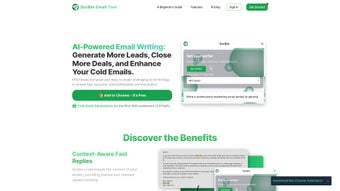
In today’s hyper‑connected workplace, email remains the backbone of business communication. Yet drafting clear, persuasive messages can be time‑consuming, especially when you’re juggling multiple threads, languages, and tone requirements. Scribix Ai steps in as a smart, AI‑driven assistant that automates the heavy lifting while preserving a human touch. Built on advanced natural‑language processing models, Scribix Ai analyzes the context of your inbox, suggests context‑aware replies, and even translates messages on the fly. The result is a seamless workflow where you spend less time typing and more time focusing on strategy.
The platform offers a free early‑access program, letting users test its capabilities without a financial commitment. Whether you’re a sales executive chasing leads, a support agent handling tickets, or a multilingual team coordinating across borders, Scribix Ai promises to boost efficiency, reduce errors, and enhance the overall impact of your correspondence. In the sections that follow, we’ll explore the core features, walk through the installation process, verify system compatibility, and weigh the pros and cons to help you decide if this AI email companion deserves a spot in your productivity toolkit.
Overview: Core Capabilities That Power Faster Email Drafting
Scribix Ai is positioned as more than a simple autocomplete. It acts as an intelligent co‑author, capable of generating entire email drafts from a single prompt, refining tone to match formal or casual settings, and providing multilingual support for over 20 languages. The AI engine learns from your past messages, adapting to your personal style and the specific jargon of your industry. Integration is another highlight: the tool plugs directly into Gmail, Outlook, and other popular providers via browser extensions or native add‑ons, ensuring you never leave your inbox to summon the assistant.
Key Features
- Rapid Draft Generation: Create full email drafts in seconds based on brief prompts or bullet points.
- Context‑Aware Replies: The AI reads the thread history to suggest replies that acknowledge previous points.
- Multilingual Support: Write and translate emails in more than 20 languages without leaving the interface.
- Tone Customization: Choose from professional, friendly, persuasive, or neutral tones with a single click.
- Seamless Integration: Browser extensions for Chrome, Edge, and Firefox; add‑ons for Outlook and Gmail.
- Secure Data Handling: End‑to‑end encryption ensures your email content never leaves your device unprotected.
- Learning Mode: The AI refines its suggestions based on your edits, becoming more accurate over time.
By consolidating these capabilities into a single, easy‑to‑use interface, Scribix Ai reduces the cognitive load of email composition. Users report up to a 40 % reduction in time spent drafting routine messages, while maintaining or improving response quality. The platform also offers a built‑in analytics dashboard that tracks metrics such as average response time and language usage, giving teams insight into communication efficiency.
Installation & Compatibility: Getting Started on Any Device
Setting up Scribix Ai is intentionally straightforward, reflecting the product’s focus on speed and accessibility. After you sign up for the free early‑access program, you’ll receive a download link for the appropriate installer based on your operating system. The tool supports Windows 10/11, macOS 10.15 and later, as well as mobile platforms (Android 8+ and iOS 13+). For desktop users, the primary distribution method is a lightweight browser extension that works with Chrome, Edge, and Firefox. Mobile users can install the native app from Google Play or the Apple App Store.
Step‑by‑step installation guide:
- Visit the official Scribix Ai website and click “Download for Windows/macOS/Android/iOS”.
- Run the installer (Windows) or drag the app to your Applications folder (macOS).
- For browser extensions, click “Add to Chrome” (or the equivalent for Edge/Firefox) and confirm the permission request.
- Launch Scribix Ai and sign in with your email address or single‑sign‑on (SSO) credentials.
- During the first run, grant the extension access to your email provider (Gmail, Outlook, etc.) so it can read thread context securely.
- Customize your preferred tone, language, and shortcut keys in the Settings panel.
- Start composing! Click the Scribix Ai icon within the email composer to generate a draft or suggest a reply.
Compatibility extends beyond operating systems. Scribix Ai works with major email services, including Gmail, Google Workspace, Microsoft 365, and Yahoo Mail. The integration relies on OAuth 2.0, meaning you never share your password with the app; instead, Scribix Ai receives a token that limits access to email composition features only. This approach satisfies most corporate security policies and aligns with GDPR and CCPA data‑privacy standards.
If you encounter issues, the support portal offers a knowledge base with troubleshooting steps for common problems such as extension conflicts, permission errors, or language model updates. Regular automatic updates ensure the AI model stays current with the latest linguistic patterns and security patches, delivering a reliable experience without manual intervention.
Final Thoughts: Should You Add Scribix Ai to Your Toolkit?
Pros
- Significant time savings on routine email drafting.
- Context‑aware suggestions that reduce the risk of miscommunication.
- Robust multilingual support for global teams.
- Easy installation across Windows, macOS, Android, and iOS.
- Secure OAuth authentication and end‑to‑end encryption.
- Free early‑access program enables risk‑free evaluation.
Cons
- Advanced tone customization may require a learning curve.
- Dependency on internet connectivity for AI processing.
- Some enterprise email policies restrict third‑party extensions.
- Feature set continues to evolve; occasional UI adjustments may be needed.
Frequently Asked Questions
Is Scribix Ai free to use?
Scribix Ai offers a free early‑access tier that includes all core drafting and translation features. Premium plans with advanced analytics and priority support are planned for future release.
Can Scribix Ai handle confidential information?
Yes. The app uses end‑to‑end encryption and processes content on secure servers. No email passwords are stored; access is granted via OAuth tokens that can be revoked at any time.
Which email providers are supported?
Scribix Ai integrates with Gmail, Google Workspace, Microsoft Outlook/Office 365, and Yahoo Mail. Additional providers are slated for future updates.
Does the tool work offline?
Draft generation requires an internet connection because the AI model runs on cloud servers. However, previously generated suggestions are cached locally for brief offline access.
How does Scribix Ai improve over time?
The “Learning Mode” observes the edits you make to AI‑generated drafts, fine‑tuning future suggestions to match your preferred phrasing, industry terminology, and tone.
Conclusion & Call to Action
If you spend a sizable portion of your day wrestling with email—whether you’re crafting sales pitches, responding to client inquiries, or coordinating across time zones—Scribix Ai offers a compelling blend of speed, accuracy, and multilingual flexibility. Its free early‑access option lets you test the technology without commitment, and the secure, OAuth‑based integration aligns with most corporate IT policies. While you may need a short adjustment period to master tone controls, the productivity gains quickly outweigh the learning curve.
Ready to experience faster, smarter email writing? Download Scribix Ai now and start your free trial today. Transform the way you communicate, break language barriers, and reclaim valuable time for higher‑impact work.



.png)



